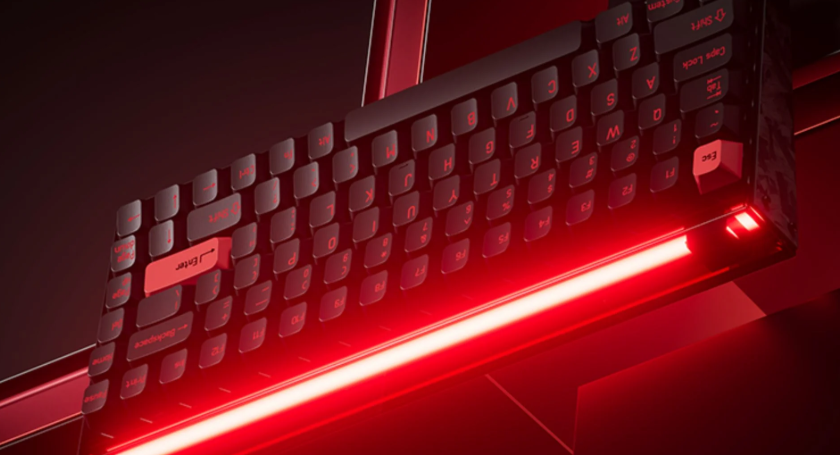
As mechanical keyboards continue to grow in popularity among gamers, programmers, designers, and office users, compact keyboard layouts have become a preferred choice for people who want more desk space without sacrificing functionality. Among these layouts, the 75 keyboard has gained significant attention because it offers a practical balance between size, performance, and everyday usability.
Unlike smaller keyboards that remove important keys or larger layouts that take up more desk space, a 75 keyboard keeps essential features such as the function row, arrow keys, and navigation controls while reducing unnecessary spacing. This makes it an attractive option for users who want a cleaner workspace while maintaining a familiar typing experience.
Whether you are building a gaming setup, upgrading your office desk, or looking for a customizable mechanical keyboard, understanding the advantages and limitations of a 75 keyboard can help you make a better decision.
What Is a 75 Keyboard?
A 75 keyboard is a compact mechanical keyboard layout that typically includes around 75% of the keys found on a traditional full-size keyboard. It removes the number pad and reduces the space between key clusters while keeping many important keys that users rely on daily.
Most 75 keyboards include
A full function row (F1–F12)
Arrow keys
Essential navigation keys such as Delete, Home, and Page Up/Page Down (depending on the design)
A compact alphanumeric typing area
The biggest difference between a 75 keyboard and a standard full-size keyboard is the removal of the dedicated number pad and reduced spacing. This allows users to save desk space while still accessing most frequently used functions.
For many users, the 75% layout provides a “best of both worlds” experience. It is smaller than a traditional keyboard but more practical than ultra-compact layouts like 60% keyboards.
Why Are 75 Keyboards Becoming More Popular?
The growing popularity of the 75 keyboard is closely connected to changing user needs. Modern computer users often work with limited desk space, multiple monitors, and portable setups. A smaller keyboard allows more room for a mouse, drawing tablet, or other accessories.
According to research from the mechanical keyboard community, compact layouts have become increasingly popular because they offer better ergonomics and customization options. Many enthusiasts prefer keyboards that reduce unnecessary hand movement while maintaining important keys.
Several factors contribute to the popularity of 75 keyboards:
1. Better desk efficiency
A smaller footprint gives users more flexibility when arranging their workspace. For gamers, the extra mouse space can improve comfort during low-sensitivity gameplay. For professionals, a cleaner desk can create a more organized working environment.
2. Strong customization options
Many 75 keyboards support hot-swappable switches, different keycap profiles, RGB lighting, and customizable layouts. Users can personalize the keyboard according to their typing preferences.
3. Balanced functionality
Some compact keyboards remove too many keys, forcing users to rely on shortcuts. A 75 keyboard keeps important functions available, making it suitable for both beginners and experienced mechanical keyboard users.
What Is the Difference Between a 75 Keyboard and Other Keyboard Sizes?
Choosing the right keyboard size depends on your daily tasks. Different layouts provide different balances between portability, functionality, and comfort.
| Keyboard Layout | Size | Main Features | Best For |
| Full-size | 100% | Includes number pad and all keys | Data entry, accounting |
| TKL | 80% | Removes number pad but keeps navigation cluster | Office, gaming |
| 75 Keyboard | 75% | Compact layout with function row and arrows | Gaming, work, general use |
| 65 Keyboard | 65% | Removes function row but keeps arrows | Compact setups |
| 60 Keyboard | 60% | Only essential typing keys | Minimalist users |
75 Keyboard vs 60 Keyboard: Which One Is Better?
A 60 keyboard is one of the smallest popular mechanical keyboard layouts. It removes the function row, arrow keys, and many navigation buttons to achieve a very compact design.
While 60% keyboards are excellent for minimalist setups and portability, they require more keyboard shortcuts. For example, accessing arrow keys often requires using function combinations.
A 75 keyboard is generally easier for everyday users because it keeps dedicated arrow keys and function keys. It provides more convenience for office work, programming, and gaming.
75 Keyboard vs TKL Keyboard: What Are the Key Differences?
A TKL (Tenkeyless) keyboard removes the number pad but keeps a traditional layout with separate navigation keys. It is slightly larger than a 75 keyboard because it includes more spacing between key groups.
The main difference is efficiency. A 75 keyboard uses a tighter arrangement, saving more desk space while maintaining similar functionality.
For users who rarely use a number pad, a 75 keyboard may provide a more compact and modern alternative to a TKL design.
75 Keyboard vs 65 Keyboard: Which Layout Fits Your Needs?
A 65 keyboard is smaller than a 75 keyboard because it removes the function row. It usually includes arrow keys and some navigation buttons.
The choice depends on your workflow. If you frequently use F-keys for software shortcuts, gaming controls, or productivity tools, a 75 keyboard may be more convenient. If portability and minimalism are your priorities, a 65 keyboard could be a better fit.
What Features Should You Look for in a 75 Keyboard?
Not all 75 keyboards provide the same experience. Factors such as switches, materials, connectivity, and customization support can significantly affect daily use.
When selecting a 75 keyboard, consider the following features:
How Do Switches Affect the Typing Experience?
Mechanical switches determine how a keyboard feels and sounds. Common switch types include:
Linear switches: Smooth keystrokes without tactile feedback, popular among gamers.
Tactile switches: Provide a noticeable bump during typing, preferred by many writers and programmers.
Clicky switches: Produce an audible click sound and tactile feedback.
For example, gamers who need fast repeated inputs may prefer smoother linear switches, while office users who type long documents may enjoy tactile switches.
Why Are Keycaps and Build Quality Important?
Keycaps influence both comfort and durability. PBT keycaps are commonly preferred by enthusiasts because they usually resist shine better than ABS keycaps over long-term use.
The keyboard’s construction also matters. Aluminum cases, gasket-mounted designs, and quality stabilizers can improve typing consistency and reduce unwanted noise.
Should You Choose a Wired or Wireless 75 Keyboard?
Wired keyboards generally provide stable connection and are popular among competitive gamers. Wireless 75 keyboards offer cleaner desk setups and more flexibility, especially for users who switch between multiple devices.
Modern wireless mechanical keyboards often include Bluetooth and 2.4GHz connections, making them suitable for workspaces and gaming environments.
Is a 75 Keyboard Good for Gaming, Work, and Everyday Use?
One reason the 75 keyboard has become popular is its versatility. It can support different types of users without requiring major compromises.
Are 75 Keyboards Suitable for Gamers?
A 75 keyboard can be a strong choice for gaming because it provides more mouse space than larger keyboards while keeping essential keys accessible.
Many gaming-focused 75 keyboards feature fast mechanical switches, customizable RGB lighting, and high polling rates. Competitive players may still evaluate factors such as latency and switch response depending on their gaming style.
Can a 75 Keyboard Improve Productivity for Office Users?
For office workers, programmers, and creators, a 75 keyboard provides a comfortable balance between functionality and desk efficiency.
The compact design reduces unnecessary reaching movements while keeping commonly used keys available. Users who work with spreadsheets extensively may still prefer a keyboard with a dedicated number pad.
Who Should Buy a 75 Keyboard?
A 75 keyboard is suitable for:
Gamers who want more mouse space
Programmers who use function keys regularly
Office workers with limited desk space
Mechanical keyboard beginners
Users who want customization options
If you are looking for different 75% layouts and mechanical keyboard options, you can explore various models through this 75 keyboard
How to Choose the Best 75 Keyboard for Your Setup?
Choosing the right 75 keyboard depends on your personal requirements.
Before purchasing, consider:
Your main usage: Gaming, programming, writing, or general computer use may require different switches and features.
Switch preference: Decide whether you prefer smooth linear switches, tactile feedback, or clicky typing sounds.
Connectivity needs: Wireless models are convenient for flexible setups, while wired options remain popular for performance-focused users.
Customization support: Features such as hot-swappable switches, programmable keys, and replaceable keycaps allow future upgrades.
A good 75 keyboard should match your workflow rather than simply follow trends. The best choice is the one that provides comfortable daily use.
Conclusion
The 75 keyboard has become one of the most popular compact mechanical keyboard layouts because it offers a practical combination of size, functionality, and customization. Compared with smaller layouts, it keeps important keys that many users need. Compared with larger keyboards, it saves valuable desk space.
For gamers, professionals, programmers, and everyday computer users, a 75 keyboard can provide a comfortable and efficient typing experience. By considering factors such as switches, keycaps, build quality, and connectivity, you can find a keyboard that fits your personal setup and working style.
FAQs
What is a 75 keyboard and why is it popular?
A 75 keyboard is a compact mechanical keyboard layout that keeps the function row and arrow keys while removing the number pad. It is popular because it saves desk space while maintaining practical functionality.
Is a 75 keyboard better than a TKL keyboard?
Neither layout is universally better. A 75 keyboard is more compact, while a TKL keyboard provides more spacing and a traditional layout. The better choice depends on your workspace and usage habits.
What should I consider when buying a 75 mechanical keyboard?
Important factors include switch type, keycap material, build quality, connectivity options, customization features, and whether the keyboard matches your main activities such as gaming or office work.